Account
How do I access my account?
You can access your account here. Under the tab "Login" you can log in with your registered e-mail address and password. If you have forgotten your password, you can reset it at https://meine.doag.org/resetpassword/. Please use the e-mail address with which you registered for the AI Navigator to log in. If you do not know it anymore, please contact our customer service.
Ticket
Where and when do I get my ticket?
After paying the invoice, you can view all your events via your account under "Tickets & Rooms", download your conference ticket and have it digitally scanned on site with your smartphone or tablet. To do this, select the "AI Navigator" and click on "Tickets and Details". If you still prefer a physical ticket that also serves as a name badge, please print it out yourself in advance and bring it with you. We will provide you with suitable sleeves including a lanyard on-site. If you use your ticket on your smartphone, make sure that your smartphone is always sufficiently charged.
I can't download my ticket. What do I have to do?
Has your ticket already been paid for? If this has not happened yet, we ask you to make the payment as soon as possible. You can also pay for your ticket on-site at the registration, but you should bring some time during peak hours. Your ticket will only be available after payment.
If you can't download your ticket although it has been paid for, please contact our customer service.
I would like to book several tickets for my colleagues. What do I have to do?
Ideally, your colleagues book their ticket for the AI Navigator independently via their own profile.
If this is not possible, you can purchase as many tickets and hotel rooms as you like and then assign them to individual colleagues and manage the group order in your account. A user profile is required for ticket allocation – it is impossible without it. Your colleagues can register here. Afterwards, your colleagues can view and edit their event information in their own account.
I have booked tickets for several colleagues, but they are not shown in their profiles. The selection of the training day is also not possible. What can I do?
If you have placed the order for your colleagues, you can manage the group order in your user account. Please note that the tickets will only be unlocked after payment. If the step has already happened, please contact our customer service.
Can I still buy a ticket on-site?
Yes, this is possible.
Can I use public transport with my ticket?
No. Your AI Navigator ticket does not include a ticket for public transport. You will need to purchase this separately. Tickets as well as information on public transport can be found here.
Arrival
Where exactly will the AI Navigator take place?
NürnbergMesse GmbH
Messezentrum Ost
90471 Nürnberg
How do I get to the AI Navigator?
Here you will find all the important information about your journey.
Public transport
Please note: Your AI Navigator ticket does not include a ticket for public transport. You will need to purchase this separately. Tickets and information about public transport can be found here.
Travel by car
Sufficient parking spaces are available in the area in front of the main entrance to NCC Ost. The parking fee is 14 Euros per day. During set-up and dismantling, parking is free of charge on the street Große Strasse.
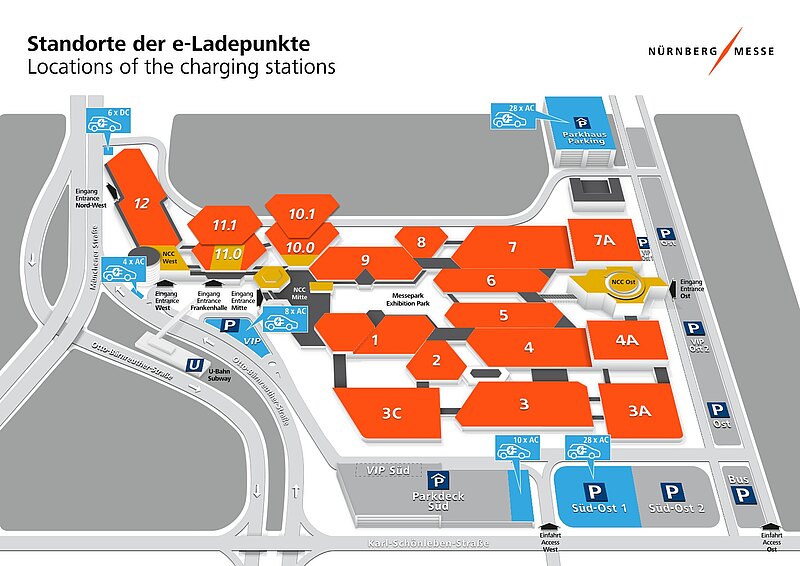
Electric cars can be charged in five areas of the exhibition center. Detailed information can be found here. Below you will find an overview of the e-charging stations at the exhibition center.
Shuttlebus
Will there be a shuttle bus again this year?
Once again this year, we will be providing our own shuttle bus service. This will run from NCC Mitte station to NCC Ost.
Monday: 2:00 pm - 7:30 pm
Tuesday: 7:00 am - 10:00 pm
Wednesday: 7:30 am - 1:00 am
Thursday: 7:30 am -7:30 pm
The travel time is 15 minutes.
Visa Support for International Attendees
International guests are warmly welcome at our conferences.
If you require a visa to travel to Germany, we can provide an official confirmation letter after the purchase of a valid conference ticket. This letter confirms your registration for the event and may be used as supporting documentation for your visa application.
Please note that the issuance of a confirmation letter does not guarantee the approval of a visa. Visa decisions are made solely by the responsible embassy or consulate.
In the event that your visa application is denied, your ticket can be cancelled free of charge upon presentation of the official visa refusal notice.
If you require a confirmation letter, please contact our team via office@doag.org after purchasing your ticket and provide your ticket number together with the personal information required for the document.
Hotel
Where can I stay overnight?
You can book your hotel room via the Nürnberg Convention Center (NCC) homepage.
Accessibility
The entire NCC site is barrier-free. For more information on on-site accessibility, click here.
Information for Speakers
I'm a speaker. What do I need to keep in mind?
We have compiled some important information for DevLand speakers here:
- All rooms are equipped with LAN/Wi-Fi, a projector, a screen, or a large monitor.
- Please bring your own laptop and any Apple and mini HDMI adapters you may need.
- As a backup bring your presentation on a USB stick.
- Remember to upload your slides and documents as presentation materials via your DOAG account (under “my activities” and then “my lectures”).
We record all sessions (except workshops and except sessions in foyers and special areas) in the rooms. If you do not want this, please inform the technician in the room before your session begins.
Infopoints & DOAG Booth
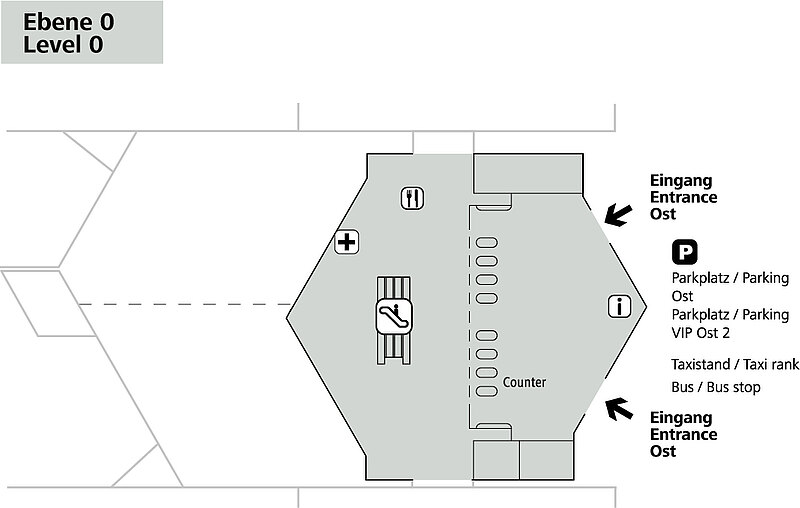
At the counters at the entrance the lanyards incl. sleeves as well as the daily news will be provided daily. If you have any questions regarding registration or ticketing, you can contact our staff here.
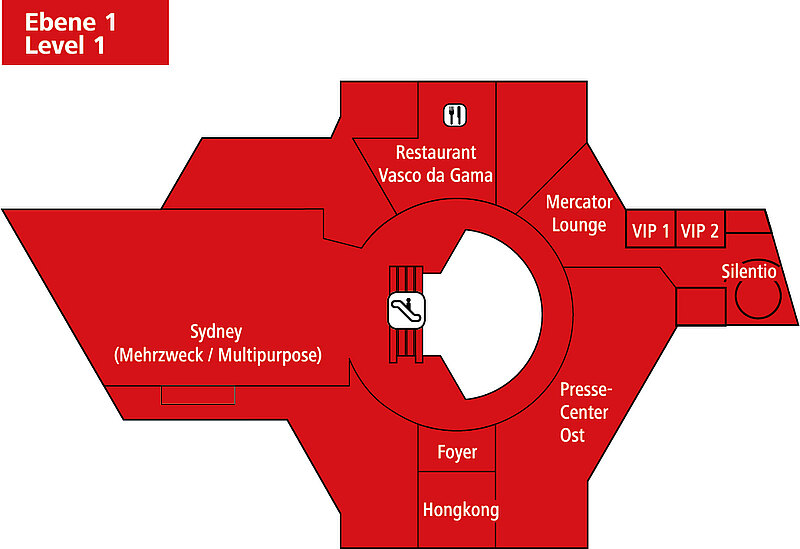
The DOAG booth on Level 1 is considered the central contact point for all participants of the event. Short-term program changes are displayed here on a flipchart – in addition to being published on our social media channels. As a speaker, you will also receive your shirt for this year here. Magazines, like the RedStack or Java aktuell, can be found here and in the press center.
You will find the wardrobe in the entrance area of the NCC Ost. To make the process as quick and easy as possible, we won't be using cloakroom tickets. All you need to drop off your coat or suitcase is your ticket with its QR code.
Wardrobe times:
Monday: 2:00 pm - 7:30 pm
Tuesday: 7:00 am - 10:00 pm
Wednesday: 7:30 am - 1:00 am
Thursday: 7:30 am -7:30 pm
Lockers are available on Level 1 (in the Press Center) and on Level -1.
Food & Beverages
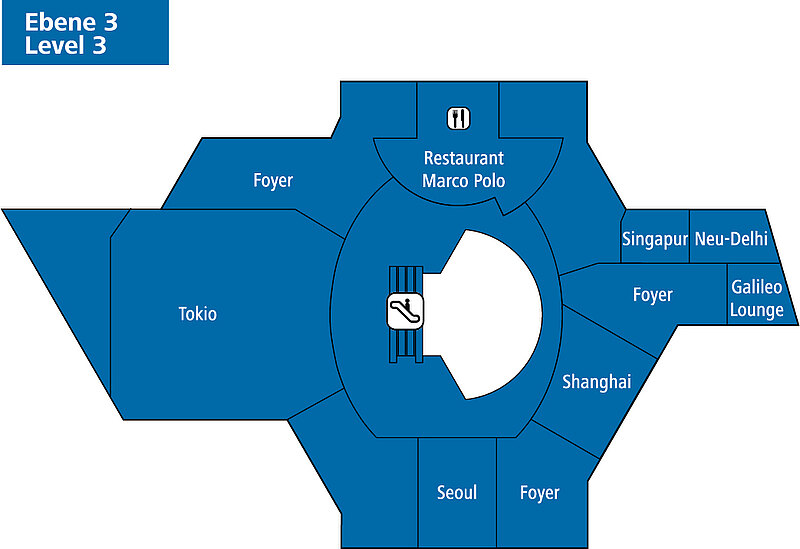
During the AI Navigator, you’ll find a wide variety of food and refreshments throughout the NCC. Restaurants Marco Polo and Vasco da Gama, as well as the food area on Level 0, offer a selection of delicious meals. There are also beverage stations on every level. The Mercator Lounge serves specialty coffees on both conference days from 10:00 a.m. to 4:00 p.m.
During regular conference hours, mineral water and apple spritzer will be available. Tea will also be served during the coffee breaks.
Wednesday – November 18
| Time | Place | |
| Welcome coffee | from 07:30 am | Level 0 |
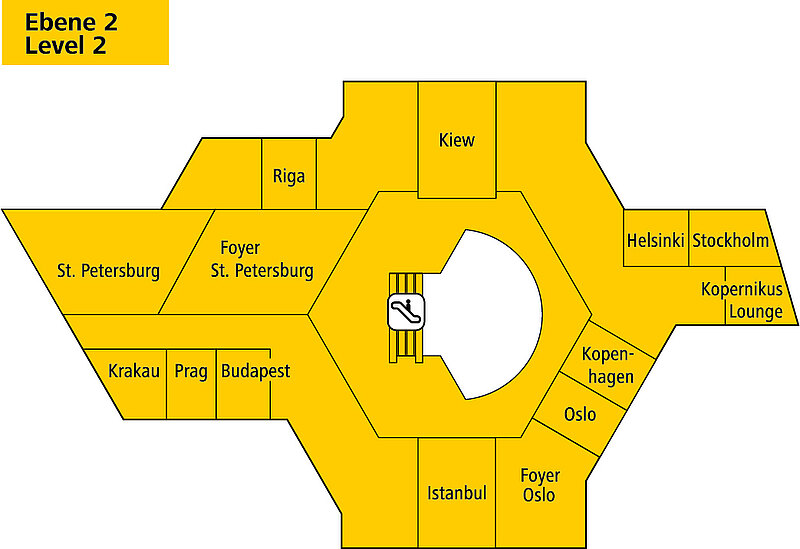
| Coffee break | 10:30 am - 11:00 am | Foyer Helsinki, Foyer Singapur, and Level 0 |
| Lunch | 11:30 am – 02:00 pm | Restaurants Marco Polo and Vasco da Gama, Level 0 + food trucks with pizza and burgers |
| Coffee break | 02:45 pm – 03:30 pm | Foyer Helsinki, Foyer Singapur, and Level 0 |
| Evening event | 07:00 pm - 11:00 pm | Beer, wine, and soft drinks on the designated levels |
| 07:30 pm – 10:00 pm | Dinner in both restaurants and on Level 0 + food trucks |
Thursday – November 19
| Time | Place | |
| Welcome coffee | from 07:30 am | Level 0 |
| Coffee break | 10:30 am – 11:00 am | Foyer Helsinki, Foyer Singapur, and Level 0 |
| Lunch | 11:30 am – 02:00 pm | Restaurants Marco Polo and Vasco da Gama, Level 0 + food trucks with pizza and burgers |
| Coffee break | 02:45 pm – 03:30 pm | Foyer Helsinki, Foyer Singapur, and Level 0 |
| Farewell | 04:30 pm - 06:00 pm | Level 0 |